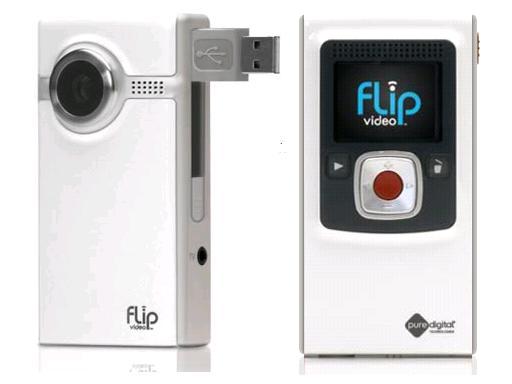
 As you may have seen I had several posts about my attempts to use the FlipCameras and iMovie to make videos. FlipCameras are digital video recording devices. They can hold up to 60 minutes of video.
Positives
- Very easy to use! Press the red button to record
- No excess cords needed. The camera comes with a built in USB to plug into your computer
- Cameras come with their own FlipShare software to edit your videos
- Really good if you don't plan to do tons of editing
- Very slow to load from camera to computer, you have to preload it when other people aren't using the computer lab
- The FlipShare software doesn't do all the effects that iMovie can but when you export the clips into iMovie they come in as one lump video not the clip pieces. This becomes difficult for the kids to separate the pieces
- FlipShare and iMovie aren't the best of friends. Some videos which were fine in FlipShare became audio only files with black visual.
- It is a bit much for some computers to handle and you need to have up-to-date software and processors
Would I do this project again? Maybe, when we have computers that can handle the video transferring. I could also scale back the project to just be video and not any sort of effects even though I think that working with the effects is some of the draw for the students. We ended up just watching the raw video footage that people took and also my video. My video, while it worked on my home computer and for my presentation at Hopkins, had problems on my iBook G4 as it is an older version of iMovie and video software. It kept pausing even after I let it sit and load. A frustrating project but I learned a lot. Mainly that our computers are not apt to handle this as I had hoped.
If you are interested in more info about FlipCameras you can check them out here http://www.theflip.com/en-us/Products/flipshare.aspx#scene=sceneMain


Cindy, I loved the info on flip camera use! Both the lesson itself as well as the thorough follow-up commentary would be extremely helpful to teachers who wish to incorporate flip camera use into their lessons. I also love your writing style! Keep this blog going!!
ReplyDeleteEllen Levin, Media Specialist
Hammond Middle School
Cindy, Thanks for posting the pros and cons with using the flip cameras. These were frustrations I experienced with the camera as well.
ReplyDeleteYour project sounded interesting. I would be interested in knowing if you thought that the results of the project (motivation and learning) were worth the extra student time spent on the technology aspect. I also was not aware of the existence of "HomePipe", which sounds pretty cool. It will be interesting to see the effects of technology on education in the next decade.
ReplyDeleteAwesome stuff Cindy! What a great way to make our students 21 century learners.
ReplyDelete